WORKING IN CANADA ON AN INTERNSHIP
What is an IEC Visa
Working holiday visas for Canada come under the International Experience Canada programme (IEC for short). IEC visas are released through a lottery system. To be eligible you must register with Immigration, Refugees and Citizenship Canada (IRCC). You will need to follow the steps in this booklet to create an account and enter the IEC visa pool. Once you are in the pool you have to cross your fingers and wait for an invitation. The earlier you enter the pool the more chances you have of your name been drawn. Depending on your nationality there are a designated number of places given each year, and sadly the applicants normally outstrip the available visas.
STEP 1 – CREATE AN IRCC ACCOUNT
Applying for an IEC working holiday visa
Once you’ve decided that you’d like to enter the IEC visa pool then you need to start by setting up an Immigration, Refugees and Citizenship Canada account (IRCC). To do so you need to click on the following link. Be aware there are many companies offering this service for a substantial fee. This is unnecessary and you can easily complete the process online for free through the Canadian governments official web Site, and with the help of this guide.
Create an account by clicking “Register for an Account”
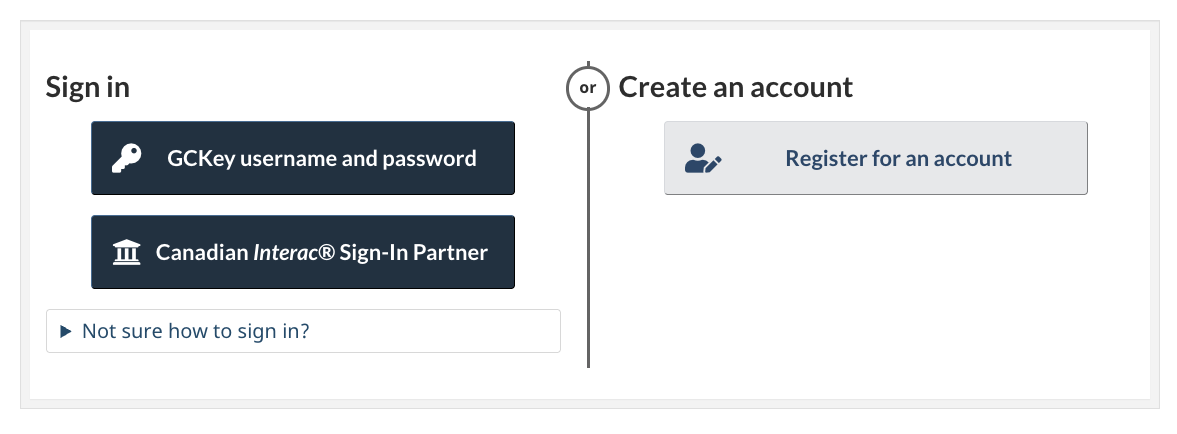
STEP 1
Choose the option to register with GCKey:
This will take you through to a Welcome to GCKey page where you need to click the “Sign Up” tab. from here you will have the option to enter all your relevent details and set up some security questions.
Create an Account:
Fill in all your details, as they appear in the passport you are applying with.
Fill out your security questions:
Make a note of your answers, ideally as a saved screen shot for future use. You’ll need to be able to answer these questions later in the application process or when agreeing to terms and conditions.
Remember to save all important information, answers and passwords for the future!
Step 2 – Logging into your IRCC account
Assessing your Eligibilty
Log into your IRCC account by clicking the sign in with “GCKey and username tab”. Follow the instructions and once on the home page, click “Start an application”, then “Apply to come to Canada”
You will be taken through to a personal check list with two options for continuing. If you’ve previously completed a come to Canada questionnaire and have saved the code then you can enter it now. If not select “International Experience Canada (IEC)” from the “I do not have a Personal Reference code” box.
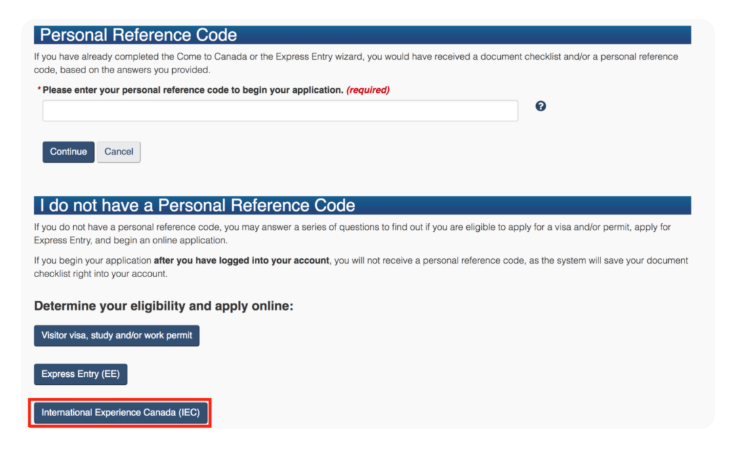
STEP 3
From here you will asked a series of questions. Go through the questionnaire carefully, all questions are listed here with advice given where required. If you are from the UK you will find that the country selection available will jump between GBR and England/Scotland/Wales/Northern Ireland, depending on the question.
What would you like to do in Canada:
IEC Travel and Work.
How long are you planning to stay in Canada:
Temporarily – more than 6 months.
Select the code that matches the one on your passport:
Select your country code.
What is your current country/territory of residence:
Select your country code where you normally reside, not your current location if travelling as a tourist.
Do you have a family member who is a Canadian Citizen or permanent resident and is 18 years or older:
Answer according to your circumstances.
What is your date of birth:
Select your DOB.
You will then move onto the next section to confirm your details.
Follow these steps to:
FURTHER QUESTIONS
Was your passport issued by [insert country name]: Options will show for your country based on your previous answers. Select yes if a correct option is present in the selection.
Do you have a letter proving one of these organisations will help you plan your trip or find work in Canada: Select No
What is your country/territory of permanent residence: This is the country you usually live in – even if you are currently travelling. For most applicants this is your country of citizenship.
Do you plan to do a work placement or internship in Canada as part of your studies: Select No. A Winter Sports Company internship is not part of a college or university course so can not be classed as a study program.
Do you have a signed letter of offer, contract of employment, or internship agreement from an employer in Canada: Select No. This will not effect you entering the pool.
Are you registered at a college or university in your country of citizenship: Answer according to your current circumstances.
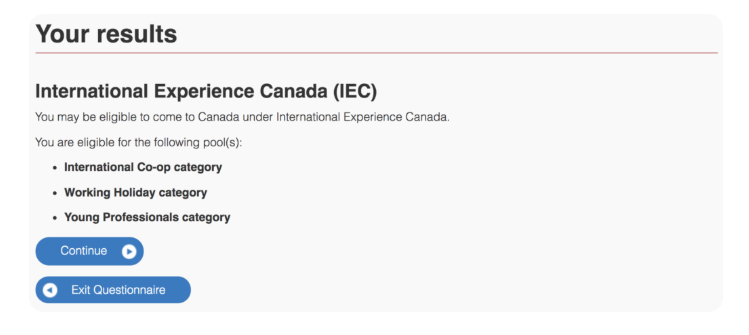
Based on your Answers you should then see your results and the pools you may be eligible for: Click “Continue”
Finishing your Application and Entering the Pool
Final Steps
For most people the only option available will be the Working Holiday Category. For an internship, this is the pool you want to select, irrespective of any other option being available. The Working Holiday visa is the most flexible and open visa. You do not need a job offer to receive your visa, and you can move freely between jobs when in Canada.
You’ll now need to fill out four sections of detailed questions before you can select which pool you wish to enter. The questions are based on your personal information, so answer them as accurately and truthfully as possible. Once all sections are completed you will be able to submit your profile to the pool.
Finally, read the disclosure statement & complete the Electronic Signature by selecting “I agree”, filling in your name, answering the security question & clicking “Sign”.
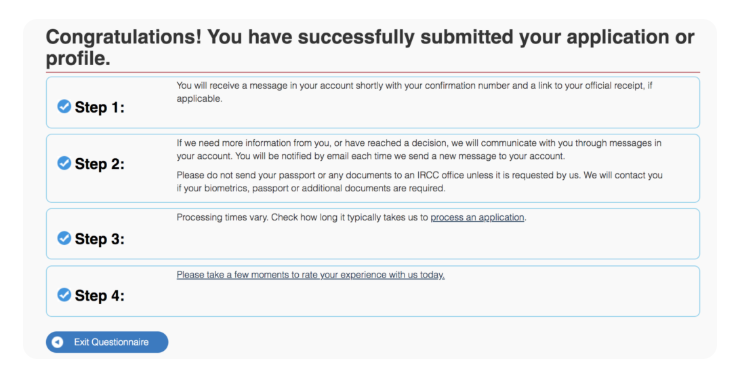
You should then receive the following message: